Editing Datasets
Depending on your role, you are allowed to edit datasets that you have created yourself and/or datasets owned by your organization. Admins and Editors have rights to edit datasets. Members are not allowed to edit datasets.
Editing metadata at a dataset level
- Navigate to the Datasets page, and search for the dataset you wish to edit.
- Select the “Manage” button – the metadata page will now appear.
How to add new resources
- Navigate to the Datasets page, and search for the dataset you wish to edit.
- Select the “Manage” button – the metadata page will now appear.
- Select the “Resources” tab at the top of the page. - the resources page will now appear
- Select “Add a new resource” to add additional resources.
- Select “Add” when you are finished.
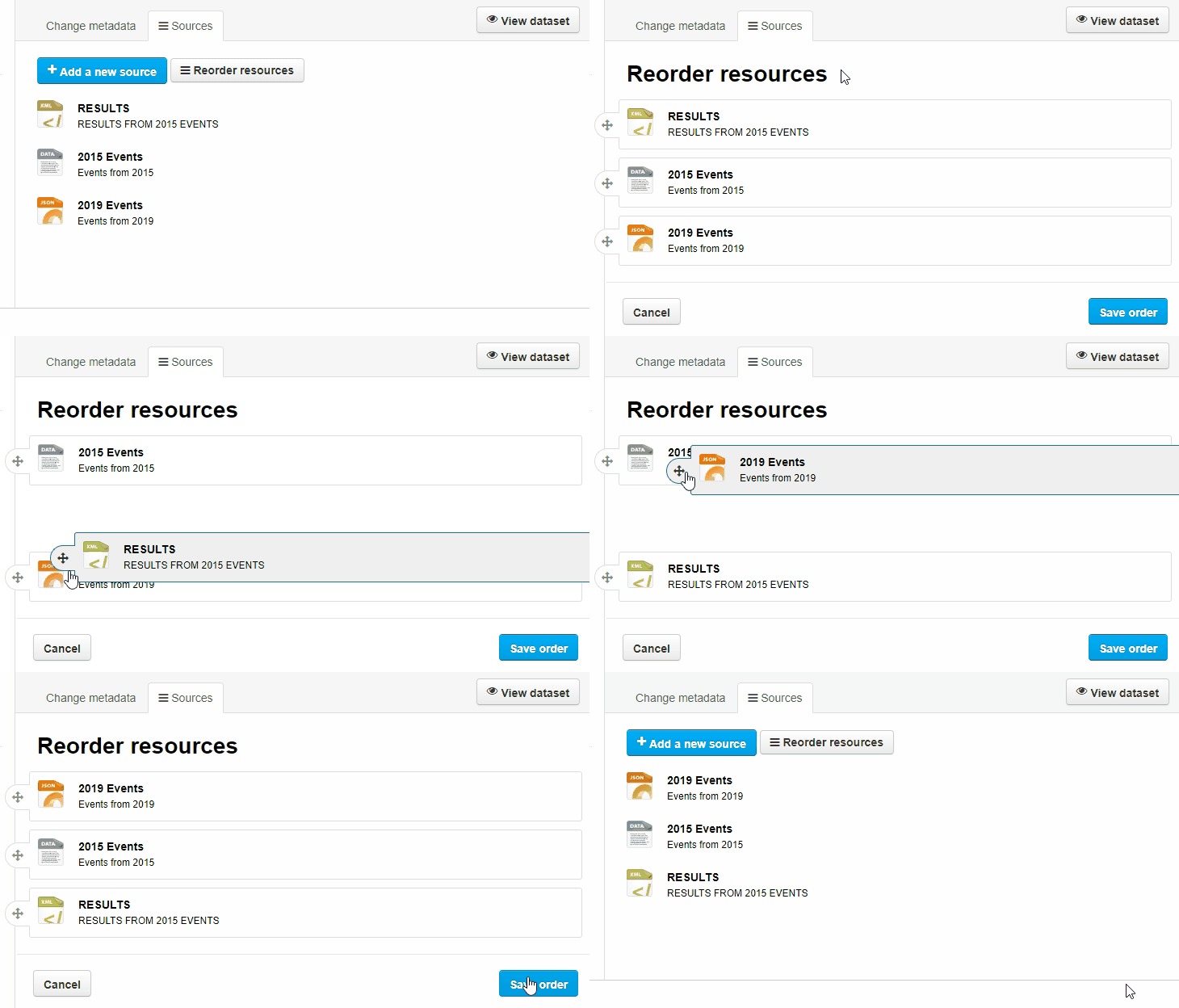
Reorder resources
- Navigate to the Datasets page, and search for the dataset you wish to edit.
- Select the “Manage” button – the metadata page will now appear.
- Select the “Resources” tab at the top of the page. - the resources page will now appear
- Select the “Reorder reources” button
- Drag-and-drop to the desired order
- Select “Save Order” when finished.
Adding Groups
A group is a thematic bundling of datasets. The list of groups is based on DCAT themes
To improve findability, each dataset is added to a group via the 'Theme' meta data field.